Data Layer Design
Source: Notion | Last edited: 2025-12-10 | ID: 2c02d2dc-3ef...
Data Layer Design
Section titled “Data Layer Design”Overview
Section titled “Overview”This project delivers the first phase of the AlphaForge market-data platform: an MVP data warehouse + ingestion system that enables reproducible backtests backed by a centralized database instead of local files.
The scope of this delivery focuses on Deliverables 1 → 5, including schema design, ClickHouse setup, historical backfill, incremental ingestion, canonical read-views, and automated data-quality validation.
Business Impact
Section titled “Business Impact”- Enables deterministic and reproducible research workflows by consolidating market data into a unified DB-backed architecture.
- Eliminates inconsistencies and human error from local CSV workflows.
- Provides the foundational infrastructure layer required for backtesting, strategy iteration, real-time streams, and analytics.
- Reduces engineering time spent fixing gaps, data drift, and quality issues through automated DQ checks and canonicalized views.
- Deliver a scalable, production-ready data schema and ingestion pipeline aligned with the MVP scope.
- Populate the database with high-quality historical data and keep it fresh through scheduled incremental ingestion.
- Ensure reproducibility with a clear snapshot/versioning model.
- Provide canonical read-views (
v_bars,v_funding,v_instruments,v_fear_greed) that downstream components can query reliably.
Requirements
Section titled “Requirements”Functional Requirements
Section titled “Functional Requirements”- Design Doc (Deliverable 1)
- Define schema for raw and canonical tables.
- Specify
ORDER BY/PARTITION BYto support efficient timeseries reads. - Document ingestion flow (backfill + incremental), deduplication, idempotency, retries, and error handling.
- Specify snapshot/versioning model for reproducible backtests.
- DB DDL + Initialization (Deliverable 2)
- ClickHouse + Iceberg table definitions for raw and curated datasets.
- Automated migrations and initialization scripts runnable in the client’s AWS environment.
- Backfill Tool + Incremental Updater (Deliverable 3)
- Ingest OHLCV, funding, metadata across Binance/OKX/Bybit for all specified symbols & intervals.
- Idempotent ingestion (no duplicates even if jobs re-run).
- Incremental updater via scheduler
- Canonical Views (Deliverable 4)
- Canonicalized SQL views exposing stable read contracts.
- Data Quality Checks (Deliverable 5)
- Missing data detection (timestamp gaps), duplicate rows, invalid OHLC values, unexpected nulls, inconsistent metadata.
- Generate actionable QC output (logs/metrics/reports).
Implementation
Section titled “Implementation”Data Source
Section titled “Data Source”Trading Market Data (via CCXT Pro)
Section titled “Trading Market Data (via CCXT Pro)”CCXT supports both REST and WebSocket. For this MVP, REST is sufficient for historical + incremental ingestion, while WebSocket is evaluated later for realtime ingestion.
Raw OHLCV
Section titled “Raw OHLCV”- Source: CCXT Manual – OHLCV
- Purpose: To retrieve vendor-specific fields (e.g., Binance’s
takerBuyBaseAssetVolume) that are not included in CCXT’s normalized OHLCV output.
- Use exchange-specific endpoints via CCXT
raw_ohlcv = binance.publicGetKlines({ 'symbol': 'BTCUSDT', 'interval': '1m', 'limit': 1000})-
This returns the full vendor-specific fields directly from Binance before CCXT normalization. OKX / Bybit
-
Similar approach: use
exchange.publicGet*()or equivalent vendor-specific endpoints to fetch raw candlestick data with all exchange-specific fields.
Fear and Greed Index
Section titled “Fear and Greed Index”- Source:
https://alternative.me/crypto/fear-and-greed-index/
Database Design
Section titled “Database Design”Based on our research, the most widely used package for fetching trading data is CCXT. Using the raw exchange responses from functions like fetch_ohlcv and vendor-specific endpoints, we designed the database schema and created the corresponding diagram.
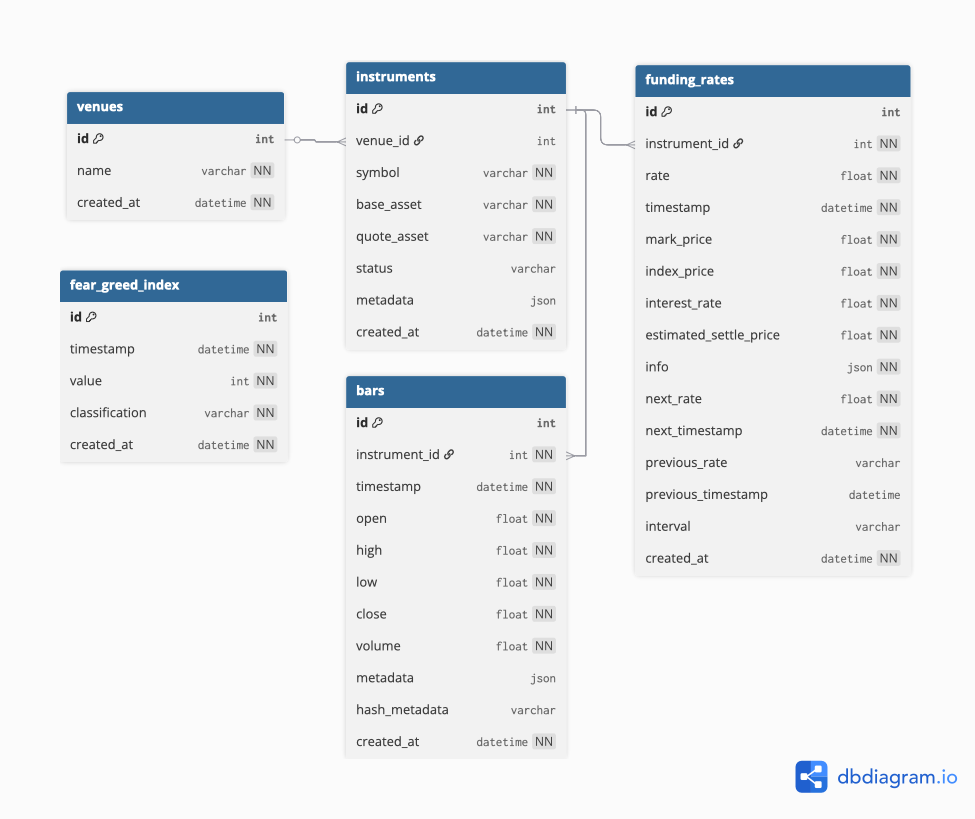
Data Layer Architecture
Section titled “Data Layer Architecture”The ClickHouse schema follows a three-layer architecture to ensure data quality, traceability, and optimal query performance:
1. Landing Layer (Raw Data)
-
Purpose: Receive raw data directly from exchange APIs without transformation
-
Characteristics:
- Stores data exactly as received from sources
- Minimal validation (only schema validation)
- Append-only, immutable
- Fast ingestion with no processing overhead
-
Tables:
landing_bars,landing_funding_rates,landing_fear_greed_index2. Staging Layer (Clean & Validated Data) -
Purpose: Clean, deduplicate, validate, and enrich data with metadata
-
Characteristics:
- Deduplication using
ReplacingMergeTree - Data quality validation (invalid OHLC, null checks, etc.)
- Adds lineage columns:
ingested_at - Source of truth for all downstream processing
- Deduplication using
-
Tables:
staging_bars,staging_funding_rates,staging_fear_greed_index -
Engine:
ReplacingMergeTreefor automatic deduplication 3. Data Mart Layer (Business Logic & Aggregations) -
Purpose: Expose clean, queryable datasets for end users and applications
-
Characteristics:
- May include aggregations, derived metrics, or business logic
- Exposed via stable views with clear contracts
- Joins with dimension tables (venues, instruments)
-
Tables:
bars,funding_rates,fear_greed_index -
Views:
v_bars,v_funding,v_instruments,v_fear_greed
Data Flow
Section titled “Data Flow”Ingestion Workflow → Landing Tables → Staging Tables → Data Mart Views → End Users (Raw) (Clean + Validate)Clickhouse DDL
Section titled “Clickhouse DDL”--- Create DatabaseCREATE DATABASE IF NOT EXISTS analytics;Layer 1: Landing Tables (Raw Data)
Section titled “Layer 1: Landing Tables (Raw Data)”Landing Bars
Section titled “Landing Bars”Purpose: Receive raw OHLCV data from exchanges
CREATE TABLE IF NOT EXISTS analytics.landing_bars ( id UInt64, instrument_id UInt32, interval String, timestamp DateTime, timestamp_unix Int64, open Float64, high Float64, low Float64, close Float64, volume Float64, metadata String, deleted_at DateTime, ingested_at DateTime)ENGINE = MergeTreePARTITION BY toDate(timestamp)ORDER BY (instrument_id, interval, timestamp_unix);Partitioning Strategy: Daily partitions (toDate) due to high data volume from 1-minute bars across multiple instruments.
Landing Funding Rates
Section titled “Landing Funding Rates”Purpose: Receive raw funding rate data from exchanges
CREATE TABLE IF NOT EXISTS analytics.landing_funding_rates ( id UInt64, instrument_id UInt32, rate Float64, timestamp DateTime, timestamp_unix Int64, mark_price Float64, index_price Float64, interest_rate Float64, estimated_settle_price Float64, info String, next_rate Float64, next_timestamp DateTime, next_timestamp_unix Int64, previous_rate Float64, previous_timestamp DateTime, previous_timestamp_unix Int64, interval String, deleted_at DateTime, ingested_at DateTime)ENGINE = MergeTreePARTITION BY toYYYYMM(timestamp)ORDER BY (instrument_id, timestamp_unix);Landing Fear and Greed Index
Section titled “Landing Fear and Greed Index”Purpose: Receive raw fear & greed data
CREATE TABLE IF NOT EXISTS analytics.landing_fear_greed_index ( id UInt64, timestamp DateTime, timestamp_unix Int64, value Int32, classification String, deleted_at DateTime, ingested_at DateTime)ENGINE = MergeTreePARTITION BY toYYYYMM(timestamp)ORDER BY timestamp_unix;Layer 2: Staging Tables (Clean & Validated Data)
Section titled “Layer 2: Staging Tables (Clean & Validated Data)”Materialized Views for Landing → Staging Pipeline
Section titled “Materialized Views for Landing → Staging Pipeline”Purpose: Automatically transform and move data from landing to staging with validation
MV: Bars Landing to Staging
Section titled “MV: Bars Landing to Staging”CREATE MATERIALIZED VIEW [analytics.mv](http://analytics.mv/)_landing_to_staging_barsTO analytics.staging_barsASSELECT id, instrument_id, interval, timestamp, timestamp_unix, open, high, low, close, volume, metadata, deleted_at, ingested_atFROM analytics.landing_barsWHERE open > 0 AND high > 0 AND low > 0 AND close > 0 AND high >= low AND volume >= 0;MV: Funding Rates Landing to Staging
Section titled “MV: Funding Rates Landing to Staging”CREATE MATERIALIZED VIEW [analytics.mv](http://analytics.mv/)_landing_to_staging_funding_ratesTO analytics.staging_funding_ratesASSELECT id, instrument_id, rate, timestamp, timestamp_unix, mark_price, index_price, interest_rate, estimated_settle_price, info, next_rate, next_timestamp, next_timestamp_unix, previous_rate, previous_timestamp, previous_timestamp_unix, interval, deleted_at, ingested_atFROM analytics.landing_funding_ratesWHERE rate BETWEEN -0.05 AND 0.05;MV: Fear & Greed Landing to Staging
Section titled “MV: Fear & Greed Landing to Staging”CREATE MATERIALIZED VIEW [analytics.mv](http://analytics.mv/)_landing_to_staging_fear_greedTO analytics.staging_fear_greed_indexASSELECT id, timestamp, timestamp_unix, value, classification, deleted_at, ingested_atFROM analytics.landing_fear_greed_indexWHERE value BETWEEN 0 AND 100;How it works:
- When data is inserted into landing tables, materialized views automatically trigger
- Data is validated during the transformation (quality checks)
- Valid data flows immediately to staging tables
- Invalid data remains in landing for investigation
ReplacingMergeTreein staging handles any duplicates automatically usingingested_at
Staging Bars
Section titled “Staging Bars”Purpose: Clean, deduplicated OHLCV data with lineage tracking
CREATE TABLE IF NOT EXISTS analytics.staging_bars ( id UInt64, instrument_id UInt32, interval String, timestamp DateTime, timestamp_unix Int64, open Float64, high Float64, low Float64, close Float64, volume Float64, metadata String, -- Lineage columns deleted_at DateTime, ingested_at DateTime)ENGINE = ReplacingMergeTree(ingested_at)PARTITION BY toDate(timestamp)ORDER BY (instrument_id, interval, timestamp_unix);Partitioning Strategy: Daily partitions (toDate) due to high data volume. With 1-minute bars across multiple exchanges and instruments, daily partitions provide optimal balance between partition size and query performance.
Staging Funding Rates
Section titled “Staging Funding Rates”Purpose: Clean, deduplicated funding rates with lineage tracking
CREATE TABLE IF NOT EXISTS analytics.staging_funding_rates ( id UInt64, instrument_id UInt32, rate Float64, timestamp DateTime, timestamp_unix Int64, mark_price Float64, index_price Float64, interest_rate Float64, estimated_settle_price Float64, info String, next_rate Float64, next_timestamp DateTime, next_timestamp_unix Int64, previous_rate Float64, previous_timestamp DateTime, previous_timestamp_unix Int64, interval String, -- Lineage columns deleted_at DateTime, ingested_at DateTime)ENGINE = ReplacingMergeTree(ingested_at)PARTITION BY toYYYYMM(timestamp)ORDER BY (instrument_id, timestamp_unix);Staging Fear and Greed Index
Section titled “Staging Fear and Greed Index”Purpose: Clean, deduplicated fear & greed data with lineage tracking
CREATE TABLE IF NOT EXISTS analytics.staging_fear_greed_index ( id UInt64, timestamp DateTime, timestamp_unix Int64, value Int32, classification String, -- Lineage columns deleted_at DateTime, ingested_at DateTime,)ENGINE = ReplacingMergeTree(ingested_at)PARTITION BY toYYYYMM(timestamp)ORDER BY timestamp_unix;Layer 3: Data Mart Tables (Query Layer)
Section titled “Layer 3: Data Mart Tables (Query Layer)”Purpose: Expose clean, optimized data for end-user consumption
Venues
Section titled “Venues”Purpose: Production table for source venues
CREATE TABLE IF NOT EXISTS analytics.venues ( id UInt32, name String, metadata String, deleted_at DateTime, created_at DateTime DEFAULT now(),)ENGINE = MergeTreeORDER BY (id);Instruments
Section titled “Instruments”Purpose: Instrument dictionary across venues (unique per exchange + symbol)
CREATE TABLE IF NOT EXISTS analytics.instruments ( id UInt32, venue_id UInt32, symbol String, base_asset String, quote_asset String, status String, type String, metadata String, deleted_at DateTime, created_at DateTime DEFAULT now())ENGINE = MergeTreeORDER BY (id);Purpose: Production OHLCV data with snapshot versioning
CREATE TABLE IF NOT EXISTS analytics.bars ( id UInt64, instrument_id UInt32, interval String, timestamp DateTime, timestamp_unix Int64, open Float64, high Float64, low Float64, close Float64, volume Float64, metadata String, deleted_at DateTime, ingested_at DateTime,)ENGINE = ReplacingMergeTree(ingested_at)PARTITION BY toDate(timestamp)ORDER BY (instrument_id, interval, timestamp_unix, ingested_at);Funding Rates
Section titled “Funding Rates”Purpose: Production funding rate data with snapshot versioning
CREATE TABLE IF NOT EXISTS analytics.funding_rates ( id UInt64, instrument_id UInt32, rate Float64, timestamp DateTime, timestamp_unix Int64, mark_price Float64, index_price Float64, interest_rate Float64, estimated_settle_price Float64, info String, next_rate Float64, next_timestamp DateTime, next_timestamp_unix Int64, previous_rate Float64, previous_timestamp DateTime, previous_timestamp_unix Int64, interval String, deleted_at DateTime, ingested_at DateTime,)ENGINE = ReplacingMergeTree(ingested_at)PARTITION BY toYYYYMM(timestamp)ORDER BY (instrument_id, timestamp_unix, ingested_at);Fear Greed Index
Section titled “Fear Greed Index”Purpose: Production fear & greed index data with snapshot versioning
CREATE TABLE IF NOT EXISTS analytics.fear_greed_index ( id UInt64, timestamp DateTime, timestamp_unix Int64, value Int32, classification String, deleted_at DateTime, ingested_at DateTime,)ENGINE = ReplacingMergeTree(ingested_at)PARTITION BY toYYYYMM(timestamp)ORDER BY (timestamp_unix, ingested_at);Database Migration
Section titled “Database Migration”We will manage a single ClickHouse data warehouse and use Flyway for schema migrations.
Flyway fully supports ClickHouse and fits our current scale and workflow.
Snapshot Strategy
Section titled “Snapshot Strategy”Database Migration
Section titled “Database Migration”We will manage a single ClickHouse data warehouse and use Flyway for schema migrations.
Flyway fully supports ClickHouse and fits our current scale and workflow.
Snapshot Strategy
Section titled “Snapshot Strategy”Ingestion pipeline
Section titled “Ingestion pipeline”1. Requirements Analysis
Section titled “1. Requirements Analysis”1.1 Historical Backfill
Section titled “1.1 Historical Backfill”Requirement: Ingest historical data for specified venues/symbols/intervals over provided date ranges.
Inputs (provided by system):
-
Venues:
binance_spot,okx_spot,bybit_spot -
Symbols:
- Spot:
BTC/USDT,ETH/USDT,SOL/USDT,XRP/USDT,SOL/BTC,ETH/BTC - Perp/Futures:
BTC/USDT,ETH/USDT,SOL/USDT,XRP/USDT,BNB/USDT
- Spot:
-
Intervals: Minimum
1mand1h(expandable to5m,15m,4h,1d) -
Date ranges: Start/end dates per venue/symbol (may vary by listing date) Constraints:
-
Must handle exchange API rate limits
-
Must support resumable backfills (job can fail and resume)
-
Must not duplicate data if re-run
1.2 Incremental Updater
Section titled “1.2 Incremental Updater”Requirement: Scheduled jobs to keep dataset up-to-date with latest data.
Schedule:
-
OHCLV, Funding Rate scheduler job (5-10 mins)
-
Fear & Greed: Daily Behavior:
-
Only append new data
-
Query warehouse for latest timestamp per symbol/interval
-
Fetch only new data from that timestamp forward Constraints:
-
Must not overlap with existing data
-
Must handle exchange API downtime gracefully
-
Must support multiple concurrent runs (idempotent)
1.3 Policy of Ingestion
Section titled “1.3 Policy of Ingestion”1.3.1 Idempotent Writes / Deduplication
Section titled “1.3.1 Idempotent Writes / Deduplication”Requirement: Re-running ingestion must not create duplicates or corrupt data. Each dataset type has slightly different strategies due to its structure and frequency.
Mechanisms:
A. OHLCV Bars
Section titled “A. OHLCV Bars”Unique keys: (instrument_id, interval, timestamp_unix, ingested_at)
Existence Check Mechanism:
- Query Latest Timestamp:
SELECT MAX(timestamp) AS last_tsFROM analytics.barsWHERE instrument_id = :instrument_id AND interval = :interval;- Determine Fetch Range:
- If
last_tsexists → fetch bars **after **last_ts - If
last_tsis NULL → fetch full historical range for backfill
- Deduplication:
- Use ReplacingMergeTree on
timestampin ClickHouse to automatically replace duplicates if any fetch overlaps previous runs.
B. Funding Rates (Perp/Futures)
Section titled “B. Funding Rates (Perp/Futures)”Unique keys: (instrument_id, timestamp)
Existence Check Mechanism:
- Query Last Funding Timestamp:
SELECT MAX(timestamp) AS last_tsFROM analytics.funding_ratesWHERE instrument_id = :instrument_id;- Determine Fetch Range:
- Fetch records **after **
last_ts - If no records exist, fetch full historical data.
- Deduplication:
- Use ReplacingMergeTree on
timestampin ClickHouse.
C. Fear & Greed Index (Daily)
Section titled “C. Fear & Greed Index (Daily)”Unique keys: timestamp
Existence Check Mechanism:
- Query Existing Dates:
SELECT MAX(timestamp) AS last_tsFROM analytics.fear_greed_index;- Determine Fetch Range:
- If
last_tsexists → fetch **daily entries after **last_ts - Otherwise → fetch all historical daily data.
- Deduplication:
-
Use ReplacingMergeTree on
timestampin ClickHouse. Skip existing: -
The backfill tool can skip symbols/intervals that already have complete data for the requested snapshot or date range.
-
Ensures that redundant fetches and writes are avoided. Guarantees:
-
Running incremental updater multiple times → only new data appended
-
Partial backfill failure → resume from last successful symbol/interval
1.3.2 Data Quality Checks
Section titled “1.3.2 Data Quality Checks”Requirement: Automatically validate incoming and existing data to detect inconsistencies, missing records, and invalid values.
Checks Required:
- Missing Bars (Time Series Gaps) (Latest day)
- Detect gaps in OHLCV data where the difference between consecutive timestamps exceeds the expected interval.
- Flag gaps exceeding the interval as data quality issues.
- Invalid OHLCV
- Identify rows where:
high < lowhigh < open OR high < closelow > open OR low > closeopen <= 0 OR high <= 0 OR low <= 0 OR close <= 0
- Negative Volume
- Identify OHLCV bars with
volume < 0:
- Funding Rate Bounds
- Detect funding rates outside reasonable bounds (e.g., ±5%):
2. Layer architecture
Section titled “2. Layer architecture”2.1 Component Design
Section titled “2.1 Component Design”graph TB subgraph APIs["Exchange APIs"] Binance["Binance<br/>Spot/Futures"] OKX["OKX<br/>Spot/Perp"] Bybit["Bybit<br/>Spot"] AltMe["Alternative.me<br/>Fear & Greed"] end
subgraph Fetchers["Exchange Fetchers Layer"] OHLCV["OHLCVFetcher<br/><br/>Fetch price data"] Funding["FundingFetcher<br/><br/>Fetch funding rates"] FearGreed["FearGreedFetcher<br/><br/>Fetch market sentiment"] end
subgraph Orchestrator["Ingestion Orchestrator"] Backfill["BackfillTool<br/>• Orchestrates<br/> historical ingestion<br/>• Uses fetchers"] Incremental["Incremental Updater<br/>• Scheduled jobs<br/>• Fetches only<br/> new data"] Quality["DataQuality Checker<br/>• Validates data<br/>• Generates Data Frame"] end
subgraph WriteInterface["Warehouse Write Interface"] WI["Write Operations<br/><br/>• Insert data with snapshot_id<br/>• Query existing data<br/>• Get metadata<br/><br/>Input: snapshot_id, venue,<br/>symbol, data models"] end
subgraph Warehouse["Database Warehouse (ClickHouse)"] RawTables["Raw Tables<br/><br/>Store historical data<br/>with snapshot versioning"] Views["Views<br/><br/>Query specific snapshot_id<br/>or latest if not specified"]
RawTables --> Views end
subgraph Plugin["AlphaForge Plugin"] PluginFunc["warehouse_clickhouse<br/><br/>Queries data from ClickHouse<br/>and returns DataFrame"] end
subgraph AlphaForge["AlphaForge Core"] Core["Strategy Orchestrator<br/><br/>Compiles strategies and<br/>runs backtests"] end
%% Connections Binance --> OHLCV OKX --> OHLCV Bybit --> OHLCV
Binance -.-> Funding OKX -.-> Funding Bybit -.-> Funding
AltMe --> FearGreed
OHLCV --> Backfill OHLCV --> Incremental
Funding --> Backfill Funding --> Incremental
FearGreed --> Backfill FearGreed --> Incremental
Backfill --> Quality Incremental --> Quality
Quality --> WI Backfill --> WI Incremental --> WI
WI --> RawTables
Views --> PluginFunc
PluginFunc --> Core
%% Styling classDef apiStyle fill:#b3d9ff,stroke:#0066cc,stroke-width:3px,color:#000 classDef fetcherStyle fill:#ffcc99,stroke:#cc6600,stroke-width:3px,color:#000 classDef orchestratorStyle fill:#d9b3ff,stroke:#6600cc,stroke-width:3px,color:#000 classDef warehouseStyle fill:#99ff99,stroke:#006600,stroke-width:3px,color:#000 classDef pluginStyle fill:#ffff99,stroke:#cc9900,stroke-width:3px,color:#000 classDef coreStyle fill:#ffb3d9,stroke:#cc0066,stroke-width:3px,color:#000
class Binance,OKX,Bybit,AltMe apiStyle class OHLCV,Funding,FearGreed fetcherStyle class Backfill,Incremental,Quality orchestratorStyle class RawTables,Views warehouseStyle class PluginFunc pluginStyle class Core coreStyle2.2 Component Descriptions
Section titled “2.2 Component Descriptions”1. Exchange APIs
Section titled “1. Exchange APIs”Purpose: External data sources providing market data via REST APIs
Sources:
-
Binance: Spot/Futures OHLCV bars, funding rates, market info
-
OKX: Spot/Perp OHLCV bars, funding rates
-
Bybit: Spot OHLCV bars only
-
Alternative.me: Daily Fear & Greed Index (0-100 scale) Key Points:
-
Each exchange has rate limits that must be respected
-
Authentication via API keys (stored in SSM Parameter Store)
-
APIs are external dependencies and may be unreliable
2. Exchange Fetchers Layer
Section titled “2. Exchange Fetchers Layer”Purpose: Provide unified interface for fetching data from different exchanges
Components:
-
OHLCVFetcher: Fetches price data (candlesticks) from all exchanges
-
FundingFetcher: Fetches funding rates from perpetual futures
-
FearGreedFetcher: Fetches market sentiment data Key Features:
-
Rate limiting to prevent API bans
-
Retry logic with exponential backoff
-
Data normalization to standard format
-
Error handling for API failures
3. Ingestion Orchestrator
Section titled “3. Ingestion Orchestrator”Purpose: Coordinate data fetching and writing workflows
Components:
BackfillTool:
-
Orchestrates historical data ingestion
-
Checks warehouse before fetching to avoid duplicates
-
Resumable on failures Incremental Updater:
-
Scheduled jobs (every 5-60 minutes)
-
Fetches only new data since last update
-
Queries warehouse for latest timestamp
-
Appends with ingested_at DataQuality Checker:
-
Validates data integrity (missing bars, invalid OHLC, duplicates)
-
Runs automated checks on schedule
-
Generates quality reports and scores
-
Outputs reports to S3
4. Warehouse Write Interface
Section titled “4. Warehouse Write Interface”Purpose: Abstract interface for writing data to warehouse
Operations:
-
Insert data with
ingested_at -
Query existing data
-
Get metadata (latest timestamps) Input Requirements:
-
ingested_at: Unique identifier for data batch -
venue: Exchange name -
symbol: Trading pair -
data models: Bar, FundingRate, or FearGreedRecord objects Implementation: ClickHouse Warehouse Writer with batch inserts and connection pooling
2.2 Backfill - Incremental Workflow
Section titled “2.2 Backfill - Incremental Workflow”2.2.1. Workflow design
Section titled “2.2.1. Workflow design”2.2.2. Workflow description
Section titled “2.2.2. Workflow description”General flow
**Phase 1: Workflow Start**
1. Trigger (manual)1. Load configuration (`instruments`, `intervals`, `date_range`)1. Create idempotent key: `snapshot_id`, `ingested_at`1. Validate parameters1. Initialize progress tracker1. Generate execution_id (for audit tracking only)**Phase 2: Parallel Execution**
1. Fan-out activities1. For each task (`venue`, `instrument`, `interval`):  - Fetch data from exchange  - Validate data quality  - Transform to schema (get `instrument_id` from instruments table)  - **Insert directly to warehouse** (no idempotency check needed)  - Engine handles dedup automatically1. Update progress tracker**Phase 3: Error Handling**
- Same (classify, retry, mark failed)**Phase 4: Completion**
- Aggregate results- Calculate statistics- Write execution metadata to audit table:
Key Workflow Characteristics
**Durability**
- Workflow state is persisted automatically- Survives crashes and restarts- Can resume from any checkpoint**Idempotency**
- Safe to retry without duplicates- Idempotency check prevents duplicate data**Observability**
- Real-time progress tracking- Query workflow state anytime- Detailed logging and metrics**Scalability**
- Parallel execution with concurrency control- Efficient resource usage**Reliability**
- Automatic retry for transient errors- Isolated failures (one task failure doesn’t stop others)**Maintainability**
- Clear separation of workflow and activity logic- Well-defined state transitions
Example Execution
**Scenario**: Backfill 1 month for 10 instruments across 2 venues
**Input**:
- Venues: `binance_spot`, `okx_spot`- Instruments: `BTCUSDT`, `ETHUSDT`, `BNBUSDT`,…- Intervals: 1h- Date range: 2024-11-01 to 2024-11-30**Total tasks**: 2 × 10 × 1 = 20 tasks
**Execution Flow**:
1. Configuration loaded and validated1. 20 tasks created and distributed1. Concurrent execution with concurrency limit = 51. Each task fetches ~720 bars (30 days × 24 hours)1. 2 tasks encounter transient errors, retry successfully1. All 20 tasks complete1. Status: COMPLETE (100%)1. Total records: 14,400**Duration**: ~5-10 minutes