Binance Managed Sub Account
Source: Notion | Last edited: 2025-12-05 | ID: ea53a6d6-8f6...
In the investor’s Binance account, create the managed sub account as shown below:
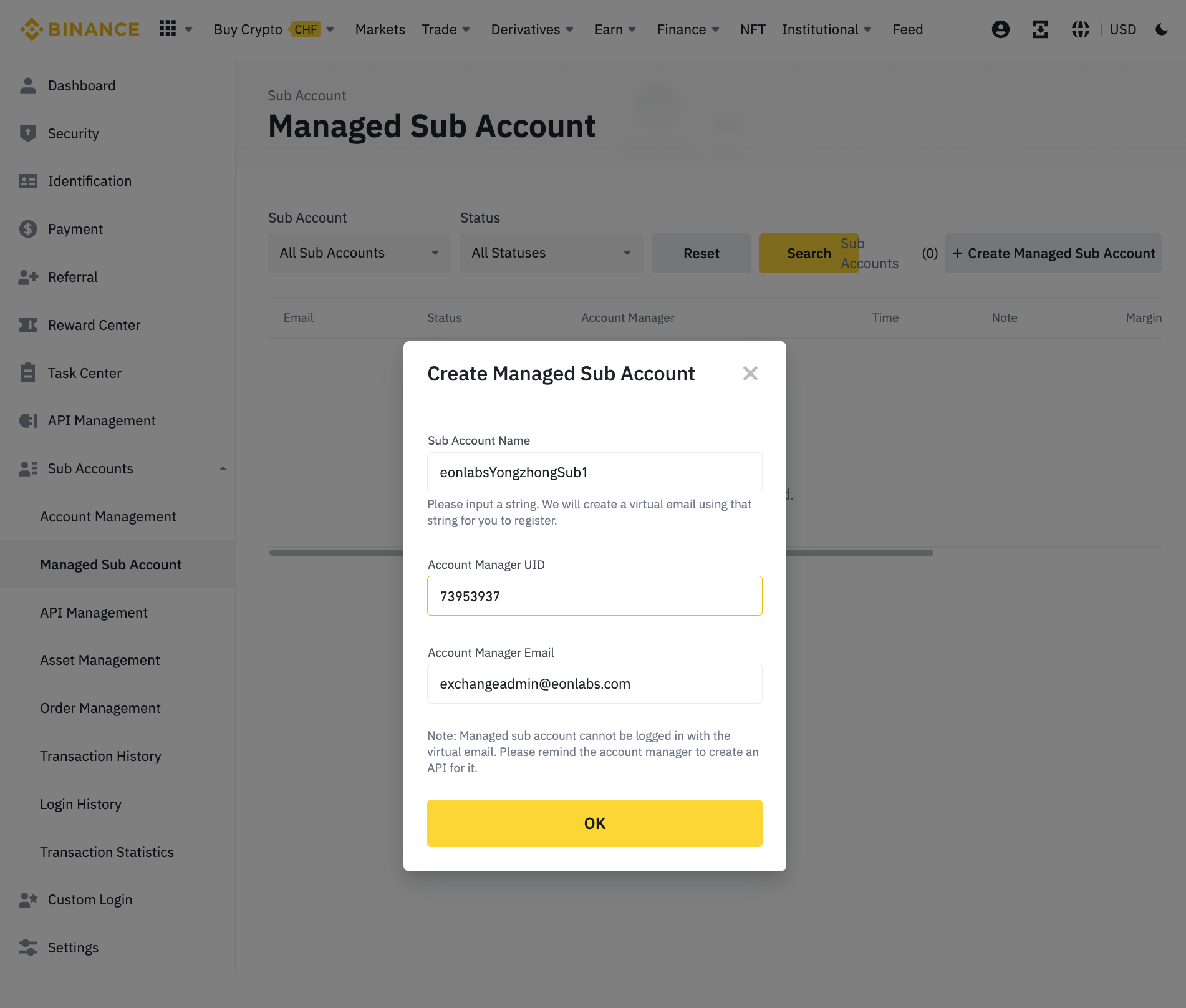
Sub Account Name: follow this pattern - eonlabs{your_account_id}sub{sub_account_number}, for example: eonlabsyongzhongsub1
User ID: 73953937
Account Manager Email: exchangeadmin@eonlabs.com
Enable Future Permission
Section titled “Enable Future Permission”In the master Binance account, enable futures by the following steps:
Account Management → Find the corresponding MSA → click … → Enable Future
Create APIs: Read & Trade
Section titled “Create APIs: Read & Trade”You can create the API key through the following steps:
Sub Accounts → API Management → Create API → System generated
For each managed sub-account for EonLabs, two APIs will need to be created:
- read only
- trade
Please follow the screenshot to config the permissions two APIs:
- Read only API
- Set permissions (Reading). As of May 2023, this is the default API permission, and no change needs to be made.
- Trade API
- Set permissions (Spot, Futures, Universal Transfer)
- Add trusted IP: 18.176.144.57
- Click Confirm
- Click Save